![OE logo.svg]](https://support.ovaledge.com/hubfs/OE%20logo.svg)
MySQL Connectivity on OvalEdgeDB
Purpose
This document outlines the db backup process of OvalEdge Database and provides step-by-step instructions for establishing connections and performing database backups.
Installation of OE Database
- Local Installation: Choose the option for local installation of OvalEdge Database.
- Host Installation (e.g., AWS, Azure): If installed on a host server, obtain the IP address for connecting to the database.
Establishing the Connection in Windows Machine
- Connect through MySQL Command-Line: Open Command Prompt and navigate to the MySQL bin folder.

- Using Host IP: If OvalEdgeDB is installed on a remote server, use the following command:

Establishing the Connection in Linux Machine
- Ensure MySQL Server is installed on the Linux machine.
- Connect to MySQL: Run the command.

- Connect to Remote Server: If OvalEdgeDB is installed on a remote server, use the command:

Database Backup Commands:
- Local Backup: Execute the command:

Example: mysqldump -u root -p ovaledgedb > D:\ovaledgebkp_210222.sql
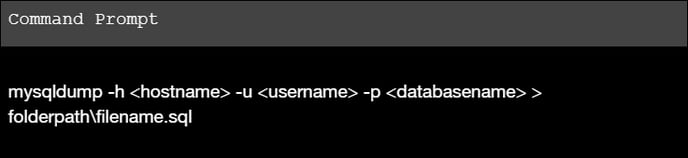
Note: The username must be the Root user. - Remote Backup: Execute the command:
Copyright © 2024, OvalEdge LLC, Peachtree Corners, GA USA